BrickLab Studio
Build it brick by brick, then press play and live in it
Your saved progress: 0 XP across 0 games · view or move it to another device
About BrickLab Studio
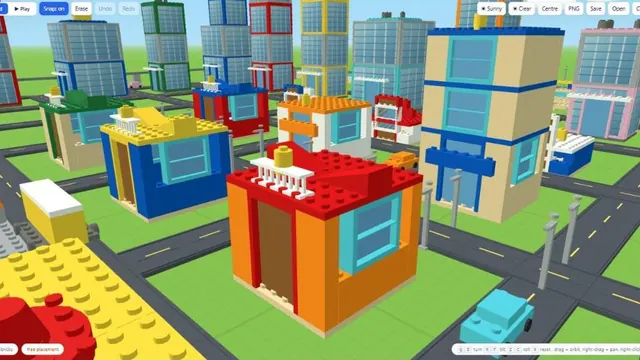
BrickLab Studio is the full 3D construction engine behind the city builder, on its own page. You place bricks in a real three-dimensional space — turn, tilt and roll each piece, snap it to a stud or drop it freely, and build at whatever scale you have patience for.
It is not only a sandbox. Guided construction walks you through a build a layer at a time if you would rather be shown than face an empty plot, and there are fast tools for the boring parts: lay a road, a rail line, a wall or a stretch of grass by clicking a start and an end rather than placing every brick.
Anything you build can be saved as a blueprint and placed again, exported as a PNG, or kept in the browser between visits. Then you press Play and the city stops being a model — the roads work and you can move through what you made.
How to play BrickLab Studio
Pick a brick and click to place it. The direction panel turns, tilts and rolls the piece before it lands, and snap can be turned off entirely when you want free placement. Right-click deletes, drag orbits the camera, right-drag pans.
If a blank plot is daunting, choose a guided construction and press Start — it builds one layer at a time and you follow along. When you are happy, save it as a blueprint so you can drop the same structure into a later city, or export a PNG of it.
How to play BrickLab Studio
- Open the page on a desktop or laptop with a mouse. Building in three dimensions takes both buttons and a bit of screen space.
- Decide how you want to start. On an empty plot, choose a brick and begin placing it. If you would prefer some direction, choose a guided construction and press Start.
- Before each brick lands, use the direction panel to turn, tilt or roll it. Leave snap on to lock the piece to a stud, or switch it off to place it freely.
- Drag to orbit around the build and right-drag to pan, then check every side. Right-click removes a brick that ended up in the wrong place.
- For the long, repetitive parts, use the fast tools. Click a start point and an end point to lay a road, a rail line, a wall or a stretch of grass.
- Save the finished structure as a blueprint, export a PNG if you want a picture of it, and press Play to move through what you built.
BrickLab Studio tips and strategy
- Lay the ground first. A stretch of grass and the main roads, drawn with the start-and-end tools, give the rest of the build something to line up with and show you how much space you really have.
- Orbit before you commit. A brick that looks right from the front can float a stud away from where you meant it. A quick drag around the build catches that before ten more bricks sit on top of it.
- Build in modules. Make one house, lamp post or station properly and save it as a blueprint. Placing copies is quicker than building each one again and keeps a street consistent.
- Use guided construction to learn. Following a build one layer at a time shows how a structure is put together from the bottom up, and that habit carries over into your own designs.
- Save tilt and roll for detail. Turning a piece is everyday work, but tilted and rolled bricks are what make roofs, ramps and decoration look deliberate rather than blocky.
- Export as you go. A PNG at each stage gives you a record of how the city grew, plus a copy you can keep outside the browser.
- Test with Play. Roads that look joined up from above can still leave gaps. Moving through the city after pressing Play is the honest way to check.
Studio or Brick Builder?
Both run on the same construction engine, but they aim at different moods. Brick Builder is the welcoming way in, with showcase cities and a gentler start. BrickLab Studio puts the whole toolset in front of you: the direction panel, snap control, blueprints, fast build tools and PNG export. If you already know what you want to make and how it should sit in three dimensions, Studio gets out of your way.
It especially suits people who plan builds carefully, who like repeating a good design across a city, or who want a picture of their work at the end. Newcomers are welcome too, as guided construction is the quickest way to learn, but anyone after a structured challenge may prefer the other BrickLab modes.
About this game
More building games
Recently added
BrickLab Studio rankings
This game reports no score of its own, so the board ranks time actually spent playing it — counted only while the tab is in front of you and you are playing, and capped each day. Today resets at midnight IST, the week resets on Monday.
Loading…
BrickLab Studio — frequently asked questions
Is this the same as Brick Builder?
It is the engine behind it, on its own page with the full toolset exposed — direction controls, blueprints, fast build tools and PNG export. Brick Builder is the friendlier front door with the showcase cities.
Does my build save?
Yes, in your browser, and you can save named blueprints to place again. Export a PNG if you want a copy outside the game.
Do I need to know how to build?
No. Guided construction picks a structure and walks you through it a layer at a time, which is the easiest way in.
Does it work on a phone?
It will load, but placing bricks in 3D wants a mouse and a reasonably large screen. A laptop is the honest recommendation.
Is it free?
Yes — no account, no download, nothing to pay.
How do I lay a long road or wall without placing every brick?
Use the fast build tools. Click where the road, rail line, wall or grass should start, then click where it should end, and the stretch in between is filled in.
How do I move the camera?
Drag to orbit around your build and right-drag to pan. Right-click on its own deletes a brick, so drag rather than click when you only want to move the view.
What happens when I press Play?
The city stops being a model. The roads work and you can move through the structures you built.
Tell us what to fix
Found a bug, or think something should play differently? This goes straight to the developer — no account, no email address required.