Draw & Guess Live
One person draws, everyone else types — each on their own device, anywhere
Playing alone, or without a connection? Draw & Guess is the single-screen version for a room full of people, with your own word lists.
Your saved progress: 0 XP across 0 games · view or move it to another device
About Draw & Guess Live
Draw & Guess Live is the drawing party game played properly online: one person draws on a shared canvas and everyone else, wherever they are, types guesses. Strokes appear on every screen as they are made.
Scoring rewards being quick. A correct guess is worth more the earlier it lands, and the second person to get it scores less than the first — so a room that all recognises the drawing is still separated by who typed first. The artist earns points for every player who gets it, which makes drawing well worth doing rather than a turn to sit out.
Near-misses are told they are close, and letters of the word appear as the clock runs down, so a turn rarely ends with nobody getting it. The word itself is never sent to the guessers — it simply is not in the data their browsers receive, so there is nothing to inspect.
How to play Draw & Guess Live
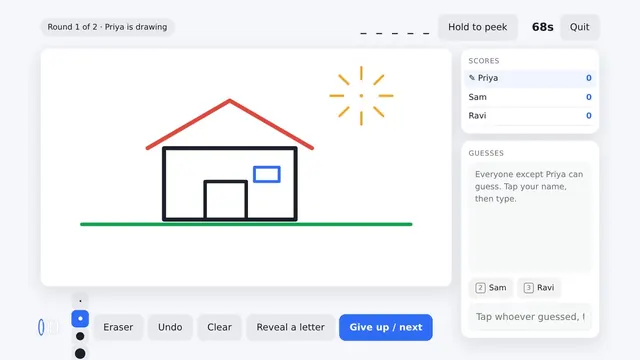
You need at least two people. Create a private room and share the five-letter code, or press quick play. Everyone takes a turn drawing; when it is yours you get three words to choose from and seventy seconds to draw.
Guessers type into the box under the canvas. Wrong guesses appear to everyone as chat, so the room can build on each other's thinking. When you get it right the box disappears and you wait for the rest — then the word is revealed and the next player draws.
How to play Draw & Guess Live
- Type a name on the home screen, then press ⚡ Quick play to join an open room or 🔑 Create a private room to start one for your group. A code from a friend goes in the CODE box, followed by Join ▶.
- Wait on the room screen until at least one other person arrives. The seat list shows everyone present and their scores.
- When it is your turn, a "Pick your word" screen offers three choices that only you can see. A bar shows how long you have to decide.
- Draw on the canvas with your finger or mouse. The toolbar beneath it has eight colours, three line widths (thin, pen and brush) and a 🗑 clear button. Your word stays at the top of your screen as a reminder.
- If someone else is drawing, you see blanks where the word should be. Type a guess and press Enter or ➤. A near miss earns a "so close!" message, and a correct guess shows your points and puts a ✓ next to your name.
- When the turn ends, everyone sees the word and how many people got it. After a short pause the next artist chooses a word. Once the last round is over, the Final scores screen ranks the room.
Draw & Guess Live tips and strategy
- Think twice before clearing. There is no undo button. 🗑 clear wipes the canvas on every screen at once, so use it to restart a drawing that has gone wrong, not to fix a single stroke.
- Brush to block in, thin to label. The brush is five times the width of the thin line. Fill big areas quickly with the brush, then switch to thin for the small detail that confirms the answer.
- Let colour do some of the work. The palette includes black, red, blue, green, amber, purple, pink and brown. Blue water, green leaves or a red roof can narrow a guess faster than another minute of outline.
- Read other people's near misses. Guesses appear in the feed for everyone, and close ones are highlighted. If someone else's guess is flagged as close, the answer is probably a near neighbour of that word.
- Keep guesses short. The guess box takes up to 40 characters, and single words or short phrases are easiest for the room to read and build on.
- Arriving mid-turn is fine. If you join while someone is drawing, the strokes made so far are replayed onto your canvas, so you can start guessing straight away.
- A tiny delay is normal. Strokes are sent in small batches a fraction of a second apart, so guessers see each line appear just after the artist draws it.
Getting a good game going
Because this version has no bots, the game is only as lively as the room. Quick play is the fastest way to find strangers to play with, while a private room is the way to keep it to friends, family or a class. The header shows the current round out of the total, whose turn it is and how many players have guessed, so everyone can follow the game even between their own turns.
It works best with four to eight players. Two is enough to play, but with more guessers there is more chat in the feed, more near misses to learn from and a bigger reward for drawing clearly. Play again ▶ takes you into quick play, so a private group wanting another game should create a fresh room and share the new code.
About this game
More party games
Recently added
Draw & Guess Live rankings
This game reports no score of its own, so the board ranks time actually spent playing it — counted only while the tab is in front of you and you are playing, and capped each day. Today resets at midnight IST, the week resets on Monday.
Loading…
Draw & Guess Live — frequently asked questions
Do we need to be in the same room?
No — that is the whole point of this version. Everyone plays on their own device from wherever they are. The single-screen Draw & Guess on this site is the one for a room full of people.
Can guessers see the word in the page?
No. The word is sent only to whoever is drawing. Guessers receive blanks and nothing else, so there is no hidden field or network message to read it from.
How many can play?
Up to eight in a room. When one fills the next player is placed in a new room automatically.
Are there bots?
No. A bot cannot draw, and a bot that only guessed would just be taking points from real players — so this game waits for people instead.
How is it scored?
A correct guess scores by how much time was left plus a bonus for guessing before others. The artist earns thirty points for every player who gets it.
Is it free?
Yes — no account, no install, nothing to pay.
What if someone joins halfway through a drawing?
They see the picture so far. The strokes already drawn this turn are replayed onto their canvas, and they can start guessing immediately.
Can I undo a stroke?
No. The only way to remove lines is the clear button, which wipes the whole canvas for everyone. For small mistakes, it is usually quicker to draw over them.
Why has the guess box disappeared?
The box is hidden while you are the artist, once you have guessed the word correctly, and while a word is being chosen or revealed between turns. It comes back for the next drawing.
Tell us what to fix
Found a bug, or think something should play differently? This goes straight to the developer — no account, no email address required.